California Housing Prices#
[1]:
import kagglehub
import os
import pandas as pd
import seaborn as sns
import matplotlib.pyplot as plt
from matplotlib.ticker import MultipleLocator
[2]:
path = kagglehub.dataset_download("camnugent/california-housing-prices")
file = os.listdir(path)[0]
Using Colab cache for faster access to the 'california-housing-prices' dataset.
About Dataset#
https://www.kaggle.com/datasets/camnugent/california-housing-prices/data
Features#
Feature’s Name |
Information |
|---|---|
longitude |
A measure of how far west a house is; a higher value is farther west |
latitude |
A measure of how far north a house is; a higher value is farther north |
housingMedianAge |
Median age of a house within a block; a lower number is a newer building |
totalRooms |
Total number of rooms within a block |
totalBedrooms |
Total number of bedrooms within a block |
population |
Total number of people residing within a block |
households |
Total number of households, a group of people residing within a home unit, for a block |
medianIncome |
Median income for households within a block of houses (measured in tens of thousands of US Dollars) |
medianHouseValue |
Median house value for households within a block (measured in US Dollars) |
oceanProximity |
Location of the house w.r.t ocean/sea |
Objectives#
Creating a model for predicting the house pricing given some informations.
Important, the data must be cleaned.
Acknowledgements#
This data was initially featured in the following paper: Pace, R. Kelley, and Ronald Barry. “Sparse spatial autoregressions.” Statistics & Probability Letters 33.3 (1997): 291-297.
This dataset is a modified version of the California Housing dataset available from: Luís Torgo’s page (University of Porto)
[3]:
# Reading file
df = pd.read_csv("/".join([path,file]))
df.head()
[3]:
| longitude | latitude | housing_median_age | total_rooms | total_bedrooms | population | households | median_income | median_house_value | ocean_proximity | |
|---|---|---|---|---|---|---|---|---|---|---|
| 0 | -122.23 | 37.88 | 41.0 | 880.0 | 129.0 | 322.0 | 126.0 | 8.3252 | 452600.0 | NEAR BAY |
| 1 | -122.22 | 37.86 | 21.0 | 7099.0 | 1106.0 | 2401.0 | 1138.0 | 8.3014 | 358500.0 | NEAR BAY |
| 2 | -122.24 | 37.85 | 52.0 | 1467.0 | 190.0 | 496.0 | 177.0 | 7.2574 | 352100.0 | NEAR BAY |
| 3 | -122.25 | 37.85 | 52.0 | 1274.0 | 235.0 | 558.0 | 219.0 | 5.6431 | 341300.0 | NEAR BAY |
| 4 | -122.25 | 37.85 | 52.0 | 1627.0 | 280.0 | 565.0 | 259.0 | 3.8462 | 342200.0 | NEAR BAY |
[4]:
df.describe()
[4]:
| longitude | latitude | housing_median_age | total_rooms | total_bedrooms | population | households | median_income | median_house_value | |
|---|---|---|---|---|---|---|---|---|---|
| count | 20640.000000 | 20640.000000 | 20640.000000 | 20640.000000 | 20433.000000 | 20640.000000 | 20640.000000 | 20640.000000 | 20640.000000 |
| mean | -119.569704 | 35.631861 | 28.639486 | 2635.763081 | 537.870553 | 1425.476744 | 499.539680 | 3.870671 | 206855.816909 |
| std | 2.003532 | 2.135952 | 12.585558 | 2181.615252 | 421.385070 | 1132.462122 | 382.329753 | 1.899822 | 115395.615874 |
| min | -124.350000 | 32.540000 | 1.000000 | 2.000000 | 1.000000 | 3.000000 | 1.000000 | 0.499900 | 14999.000000 |
| 25% | -121.800000 | 33.930000 | 18.000000 | 1447.750000 | 296.000000 | 787.000000 | 280.000000 | 2.563400 | 119600.000000 |
| 50% | -118.490000 | 34.260000 | 29.000000 | 2127.000000 | 435.000000 | 1166.000000 | 409.000000 | 3.534800 | 179700.000000 |
| 75% | -118.010000 | 37.710000 | 37.000000 | 3148.000000 | 647.000000 | 1725.000000 | 605.000000 | 4.743250 | 264725.000000 |
| max | -114.310000 | 41.950000 | 52.000000 | 39320.000000 | 6445.000000 | 35682.000000 | 6082.000000 | 15.000100 | 500001.000000 |
[5]:
# Checking the features
df.info()
<class 'pandas.core.frame.DataFrame'>
RangeIndex: 20640 entries, 0 to 20639
Data columns (total 10 columns):
 #   Column              Non-Null Count  Dtype
---  ------              --------------  -----
 0   longitude           20640 non-null  float64
 1   latitude            20640 non-null  float64
 2   housing_median_age  20640 non-null  float64
 3   total_rooms         20640 non-null  float64
 4   total_bedrooms      20433 non-null  float64
 5   population          20640 non-null  float64
 6   households          20640 non-null  float64
 7   median_income       20640 non-null  float64
 8   median_house_value  20640 non-null  float64
 9   ocean_proximity     20640 non-null  object
dtypes: float64(9), object(1)
memory usage: 1.6+ MB
[6]:
# Checking the missing values in the dataset
df.isnull().sum()
[6]:
| 0 | |
|---|---|
| longitude | 0 |
| latitude | 0 |
| housing_median_age | 0 |
| total_rooms | 0 |
| total_bedrooms | 207 |
| population | 0 |
| households | 0 |
| median_income | 0 |
| median_house_value | 0 |
| ocean_proximity | 0 |
[7]:
# Filling the missing value
df['total_bedrooms'] = df['total_bedrooms'].fillna(df['total_bedrooms'].median())
df.isnull().sum()
[7]:
| 0 | |
|---|---|
| longitude | 0 |
| latitude | 0 |
| housing_median_age | 0 |
| total_rooms | 0 |
| total_bedrooms | 0 |
| population | 0 |
| households | 0 |
| median_income | 0 |
| median_house_value | 0 |
| ocean_proximity | 0 |
[8]:
# Checking the outliers for numerical features
df_OnlyFloat = df.select_dtypes('float64')
df_OnlyFloatCols = df_OnlyFloat.columns

fig, ax = plt.subplots(figsize=(10,8), ncols=3, nrows=3)
k = 0
for i in range(3):
  for j in range(3):
    getFeatureCol = df_OnlyFloatCols[k]
    sns.histplot(df_OnlyFloat[getFeatureCol], kde=True, ax=ax[i][j])
    plt.tight_layout()
    k += 1

[9]:
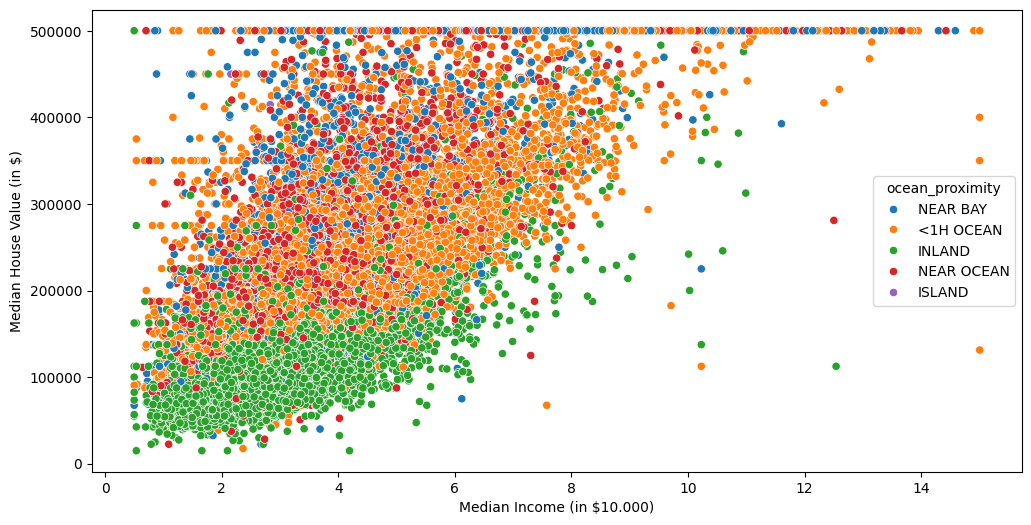
fig, ax = plt.subplots(figsize=(12,6))
sns.scatterplot(data=df, x='median_income', y='median_house_value', hue='ocean_proximity', ax=ax)
ax.set_ylabel('Median House Value (in $)')
ax.set_xlabel('Median Income (in $10.000)')
[9]:
Text(0.5, 0, 'Median Income (in $10.000)')
[10]:
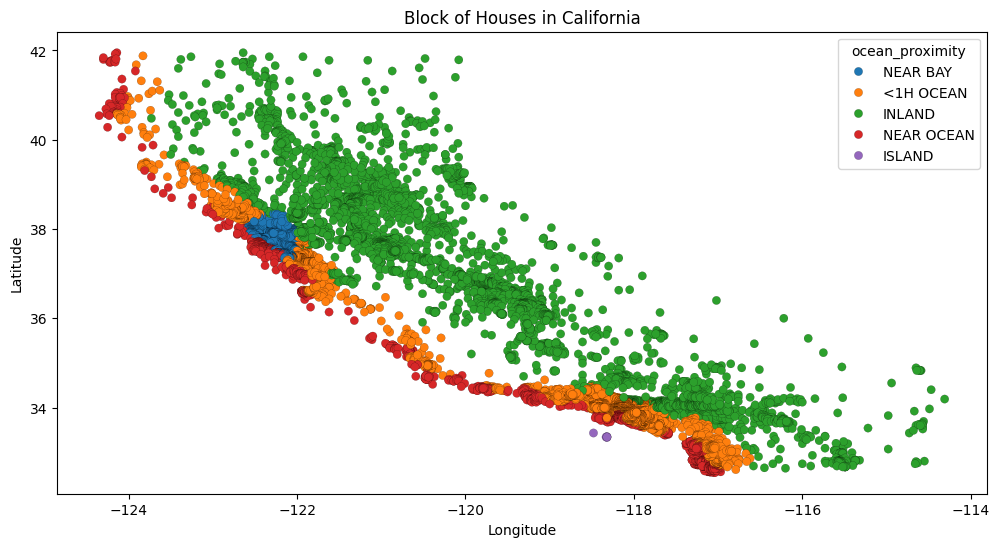
fig, ax = plt.subplots(figsize=(12,6))
sns.scatterplot(data=df, x='longitude', y='latitude', hue='ocean_proximity', edgecolor='black', linewidth=0.1)

ax.set_xlabel('Longitude')
ax.set_ylabel('Latitude')
ax.set_title('Block of Houses in California')
[10]:
Text(0.5, 1.0, 'Block of Houses in California')
[11]:
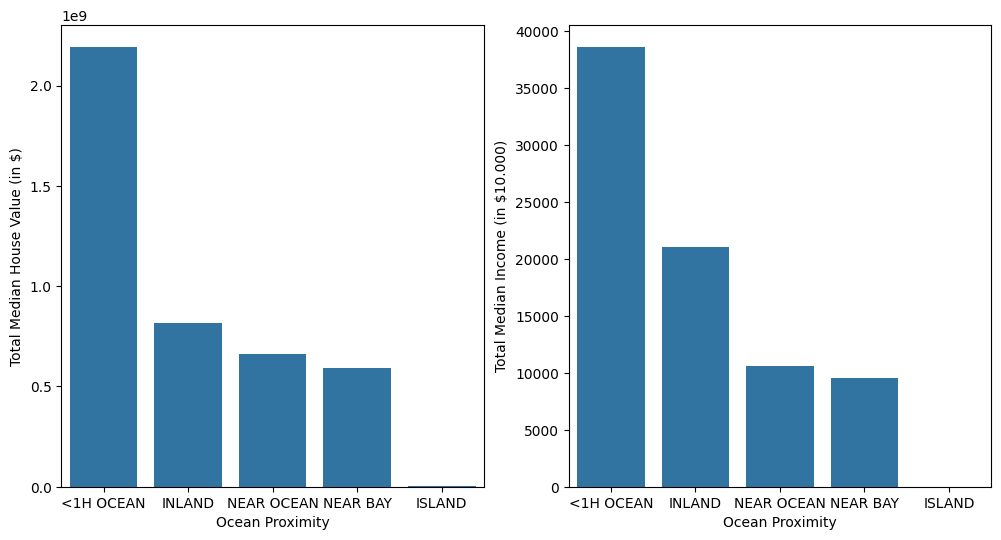
df_OceanProximityAgg = df.groupby(by='ocean_proximity').agg(
    {'median_income' : 'sum', 'median_house_value' : 'sum'}
    )
df_OceanProximityAgg = df_OceanProximityAgg.sort_values(by='median_house_value', ascending=False)
[12]:
fig, ax = plt.subplots(figsize=(12,6), ncols=2)
sns.barplot(data=df_OceanProximityAgg, x='ocean_proximity', y='median_house_value', ax=ax[0])
ax[0].set_ylabel('Total Median House Value (in $)')
ax[0].set_xlabel('Ocean Proximity')

sns.barplot(data=df_OceanProximityAgg, x='ocean_proximity', y='median_income', ax=ax[1])
ax[1].set_ylabel('Total Median Income (in $10.000)')
ax[1].set_xlabel('Ocean Proximity')
[12]:
Text(0.5, 0, 'Ocean Proximity')
For the ocean_proximity, it must be encoded to numerical data.
[13]:
mapper = {'<1H OCEAN' : 1, 'INLAND' : 2, 'NEAR OCEAN' : 3, 'NEAR BAY' : 4, 'ISLAND' : 5}

df['ocean_proximity_encoded'] = df['ocean_proximity'].map(mapper)

df.head()
[13]:
| longitude | latitude | housing_median_age | total_rooms | total_bedrooms | population | households | median_income | median_house_value | ocean_proximity | ocean_proximity_encoded | |
|---|---|---|---|---|---|---|---|---|---|---|---|
| 0 | -122.23 | 37.88 | 41.0 | 880.0 | 129.0 | 322.0 | 126.0 | 8.3252 | 452600.0 | NEAR BAY | 4 |
| 1 | -122.22 | 37.86 | 21.0 | 7099.0 | 1106.0 | 2401.0 | 1138.0 | 8.3014 | 358500.0 | NEAR BAY | 4 |
| 2 | -122.24 | 37.85 | 52.0 | 1467.0 | 190.0 | 496.0 | 177.0 | 7.2574 | 352100.0 | NEAR BAY | 4 |
| 3 | -122.25 | 37.85 | 52.0 | 1274.0 | 235.0 | 558.0 | 219.0 | 5.6431 | 341300.0 | NEAR BAY | 4 |
| 4 | -122.25 | 37.85 | 52.0 | 1627.0 | 280.0 | 565.0 | 259.0 | 3.8462 | 342200.0 | NEAR BAY | 4 |
[14]:
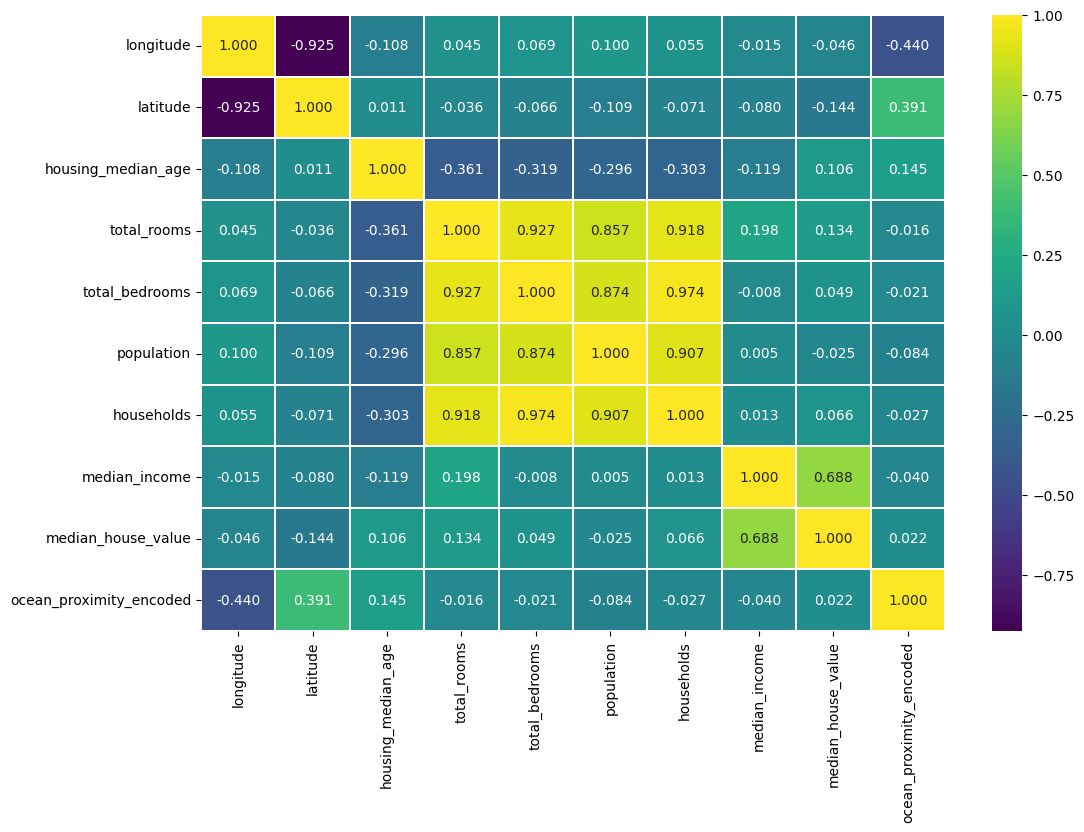
# plotting the pairplot to see the correlation for pair of features

fig, ax = plt.subplots(figsize=(12,8))
sns.heatmap(df.corr(numeric_only=True), cmap='viridis', linewidths=.2, fmt='.3f', annot=True, ax=ax)
[14]:
<Axes: >
[15]:
# Checking the outliers for numerical features
df_OnlyFloat = df.select_dtypes('float64')
df_OnlyFloatCols = df_OnlyFloat.columns

fig, ax = plt.subplots(figsize=(10,8), ncols=3, nrows=3)
k = 0
for i in range(3):
  for j in range(3):
    getFeatureCol = df_OnlyFloatCols[k]
    sns.boxplot(df_OnlyFloat[getFeatureCol], ax=ax[i][j])
    plt.tight_layout()
    k += 1

[16]:
df_clean = df.copy(deep=True)
[17]:
# Removing outlier using IQR method
features = ['total_rooms', 'total_bedrooms', 'population', 'households', 'median_income', 'median_house_value']
n_iteration = 6

for i in range(n_iteration):
  for feature in features:
    Q1 = df_clean[feature].quantile(0.25)
    Q3 = df_clean[feature].quantile(0.75)
    IQR = Q3 - Q1

    # Filtering
    lower_bound = Q1 - 1.5 * IQR
    upper_bound = Q3 + 1.5 * IQR
    df_clean = df_clean[(df_clean[feature] >= lower_bound) & (df_clean[feature] <= upper_bound)]
[19]:
# Checking the outliers for numerical features
df_OnlyFloat = df_clean.select_dtypes('float64')
df_OnlyFloatCols = df_OnlyFloat.columns

fig, ax = plt.subplots(figsize=(10,8), ncols=3, nrows=3)
k = 0
for i in range(3):
  for j in range(3):
    getFeatureCol = df_OnlyFloatCols[k]
    sns.boxplot(df_OnlyFloat[getFeatureCol], ax=ax[i][j])
    plt.tight_layout()
    k += 1

[20]:
# Checking the outliers for numerical features, except for longitude and latitude
df_OnlyFloat = df_clean.select_dtypes('float64')
df_OnlyFloatCols = df_OnlyFloat.columns

fig, ax = plt.subplots(figsize=(10,8), ncols=3, nrows=3)
k = 0
for i in range(3):
  for j in range(3):
    getFeatureCol = df_OnlyFloatCols[k]
    sns.histplot(df_OnlyFloat[getFeatureCol], kde=True, ax=ax[i][j])
    plt.tight_layout()
    k += 1

[21]:
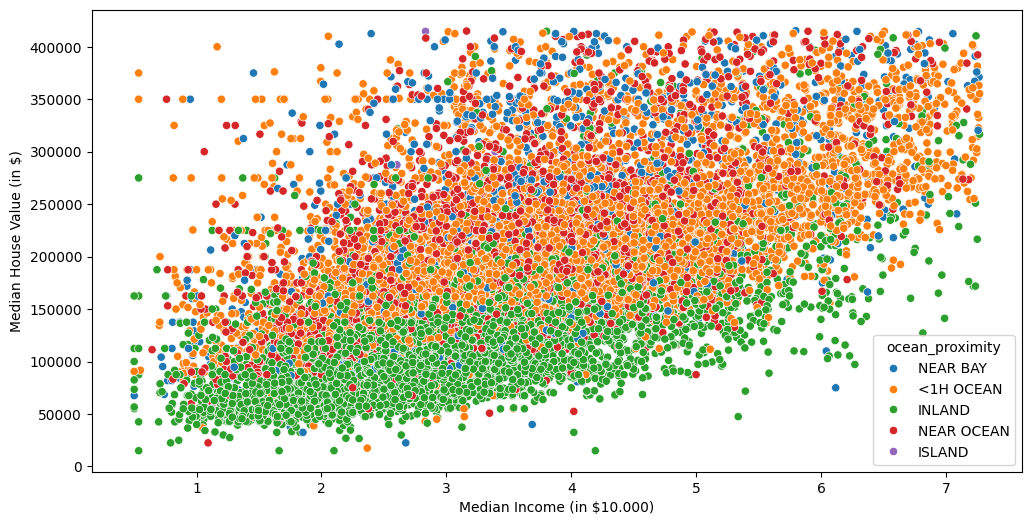
fig, ax = plt.subplots(figsize=(12,6))
sns.scatterplot(data=df_clean, x='median_income', y='median_house_value', hue='ocean_proximity', ax=ax)
ax.set_ylabel('Median House Value (in $)')
ax.set_xlabel('Median Income (in $10.000)')
[21]:
Text(0.5, 0, 'Median Income (in $10.000)')
[22]:
# plotting the pairplot to see the correlation for pair of features

fig, ax = plt.subplots(figsize=(12,8))
sns.heatmap(df_clean.corr(numeric_only=True), cmap='viridis', linewidths=.2, fmt='.3f', annot=True, ax=ax)
[22]:
<Axes: >

[23]:
# The median_income has clear positive correlation with the median house value
# The increasing the median income, the increase the median house value.
# However, the increasing median house value is less significant due to the total
# population, house median age, households, total rooms, and total bedrooms.
# In this case, the median_house_value is the target for creating a linear model
# The rest of features will be as the data

from sklearn.preprocessing import StandardScaler
from sklearn.linear_model import LinearRegression
from sklearn.metrics import r2_score, mean_squared_error, root_mean_squared_error, mean_absolute_percentage_error
from sklearn.model_selection import train_test_split
[24]:
scaler = StandardScaler().set_output(transform="pandas")
[25]:
y = df_clean['median_house_value']
x = df_clean.drop(['median_house_value', 'ocean_proximity', 'longitude', 'latitude'], axis=1)

# split the dataset into training and testing datasets
x_train, x_test, y_train, y_test = train_test_split(x, y, test_size=0.2, random_state=42)

# Scalling
x_train_scaled = scaler.fit_transform(x_train)
x_test_scaled = scaler.transform(x_test)

# Training the dataset using LinearRegression
linear_model = LinearRegression()
linear_model.fit(x_train_scaled, y_train)


y_pred = linear_model.predict(x_test_scaled)

# evaluating model
r2 = r2_score(y_test, y_pred)
rmse = root_mean_squared_error(y_test, y_pred)
mae_p = mean_absolute_percentage_error(y_test, y_pred)

print(f"R2: {r2:.4f}")
print(f"RMSE: {rmse:.4f}")
print(f"MAE(%): {mae_p:.4f}")
R2: 0.5113
RMSE: 59195.7423
MAE(%): 0.3103